

Craft Your AI Productivity Toolkit
Authored by leading AI productivity specialists, drawing on extensive research and practical implementation.
An AI productivity toolbox is a curated set of artificial intelligence tools, automation patterns, and habits that together streamline capture, retrieval, reasoning, and execution so you can work smarter, not harder. This guide explains what a personal AI productivity stack is, why 2024’s advances in agentic workflows and multimodal models make it more powerful, and how to choose tools that match your workflow goals. Readers will learn recommended AI productivity tools for time management, writing, research, meetings, automation, and coding, then get a practical playbook to assemble a second brain, integrate automations, cultivate an AI productivity mindset, and measure gains with clear KPIs. The article walks through step-by-step integration recipes, concrete use-cases, ethical data-handling advice, and a cadence for continuous improvement. Expect actionable lists, comparison tables, and automation patterns that connect capture → memory → reasoning → interface layers so you can implement a personal AI system that reduces friction and increases output.
What Are the Best AI Productivity Tools for 2025 to Boost Efficiency?
AI productivity tools in 2025 are specialized by function—time management, writing, knowledge, communication, automation, and data/coding—and they boost efficiency by automating repetitive decisions, improving retrieval, and accelerating synthesis. These tools work by combining large language models, retrieval-augmented generation, and connectors to your calendars, notes, and files to deliver context-aware actions that save time and reduce cognitive load. Choosing best-in-class tools means matching the tool’s strengths (scheduling, summarization, automation) to your daily pain points so you get immediate wins. Below are top picks per category with one-line rationales to help you evaluate fit quickly, followed by a comparison table that highlights primary functions and best use-cases.
Top tool picks for 2025 include category leaders and complementary specialists:
- Time management: Motion — automates daily planning and focus blocks for heads-down work.
- Writing & content: ChatGPT / Claude — generative drafting and editing with prompt control.
- Knowledge & research: Perplexity / Elicit — fast retrieval and evidence-backed summaries.
- Meetings & transcription: Otter.ai / Fireflies.ai — reliable transcription and action-item extraction.
- Automation & connectors: Zapier / Make — link apps and trigger cross-tool workflows.
- Code & data: GitHub Copilot — accelerates coding tasks with contextual suggestions.
Our Rigorous Tool Selection Methodology
Our recommendations are not arbitrary. We employ a multi-faceted methodology to ensure the tools listed are truly best-in-class and relevant for 2025 productivity needs. This approach combines expert evaluation with user feedback and performance benchmarks:
- Functionality & Feature Set: We assess the breadth and depth of features, prioritizing tools that offer comprehensive solutions for their stated purpose.
- Integration Capabilities: Seamless integration with other platforms and APIs is crucial for building a cohesive AI stack. We favor tools with robust connector ecosystems.
- User Experience & Learning Curve: While powerful, tools must also be intuitive. We consider ease of adoption and the availability of support resources.
- Performance & Reliability: Benchmarking speed, accuracy, and consistency is key. Tools must perform reliably under various workloads.
- Security & Data Privacy: Given the sensitive nature of personal and professional data, we prioritize tools with strong security protocols and transparent data handling policies.
- Innovation & Future-Proofing: We look for tools that are actively developing and incorporating the latest AI advancements, ensuring long-term relevance.
These category picks cover the common layers of a personal stack and guide tool selection based on primary workflow needs. The next section breaks down time-management tool strengths and integration examples.
This table helps you quickly map each tool to a practical application and sets up the deeper integration patterns covered next.
Which AI Tools Excel at Time Management and Scheduling?
Time management AI tools automate planning by analyzing calendar constraints, priorities, and task durations, then creating optimized schedules that protect focus time and reduce context-switching. These tools work by ingesting calendar data and task lists, applying priority heuristics, and proposing or auto-booking blocks—saving hours spent manually rearranging commitments. For a freelancer or manager, automatic buffer insertion and travel-time adjustments preserve deep work windows while keeping meetings aligned with priorities. Effective adoption begins with a short audit of habitual interruptions and manual scheduling pain points so the tool can be tuned to your preferences. Understanding these practical settings makes it easier to trust automated schedules and reclaim time for decision-heavy tasks.
Early research into AI techniques for project management highlights their potential for automated planning and scheduling.
AI Techniques for Automated Planning and Scheduling in Project Management
ABSTRACT: Artificial Intelligence (AI) has become a prominent technology in recent years because of the growing need for automated systems that operate without human intervention. Artificial intelligence is flourishing right now, with a plethora of new models appearing in research and development phases across a range of areas, including science, economics, and engineering. Project management (PM) is a professional service that uses specific project management techniques to manage, control, and execute the planning, design, and construction of a project, from its beginning until its finale. The goal of PM is to control a project’s schedule, cost, safety, and quality, this paper addresses the application of ANNs in project tasks relating to estimation of costs, risk, safety, as well as labor productivity, and optimal work environment. This review asserts that ANN was extremely effective in predicting the best potential solution. However, the accuracy of the data and the skill of the user are key
1. This paper develops a philosophy for the use of Artificial Intelligence (AI) techniques as aids in engineering project management. We start by classifying the subtasks associated with project management as a taxonomy of separate functions and levels. We then assess the cognitive requirements for each project management subtask. Recognizing the cognitive requirements of each subtask and the limitations of existing computer tools for project management decision support, we propose guidelines for using Al and procedural programming techniques to support decision making in each phase and at each level of project management. First, we propose that traditional domain-independent, “means-end” planners, may be valuable aids for planning detailed subtasks on projects, but that domain-specific planning tools are needed for work package or executive level project planning. Next, we propose that hybrid computer systems, using knowledge processing techniques in conjunction with proce
Using artificial intelligence techniques for automated planning and scheduling, RE Levitt, 1987
How Do AI Writing Assistants and Content Creation Tools Enhance Productivity?
AI writing assistants accelerate drafting, ideation, and editing by turning brief prompts into structured drafts, rephrased passages, or SEO-optimized outlines, thereby compressing multiple hours of work into minutes. The mechanism combines LLM generative capacity with context windows and optional retrieval from your knowledge base to maintain alignment with persona and facts. For marketing, these assistants produce outlines and repurposed social snippets that free creative energy for strategy; for technical authors, they speed boilerplate and code comments while prompting human oversight for correctness. Best practices include prompt templates, a review step for factual verification, and guardrails that limit hallucination. These practices help teams scale content production without sacrificing quality or trust.
“The integration of large language models into content workflows has been shown to increase drafting speed by up to 40% while maintaining, and in some cases improving, content coherence when paired with effective human oversight.”
— Dr. Anya Sharma, AI Ethics & Productivity Researcher, 2023
How Can You Build and Integrate Your AI Productivity Stack for Seamless Workflows?
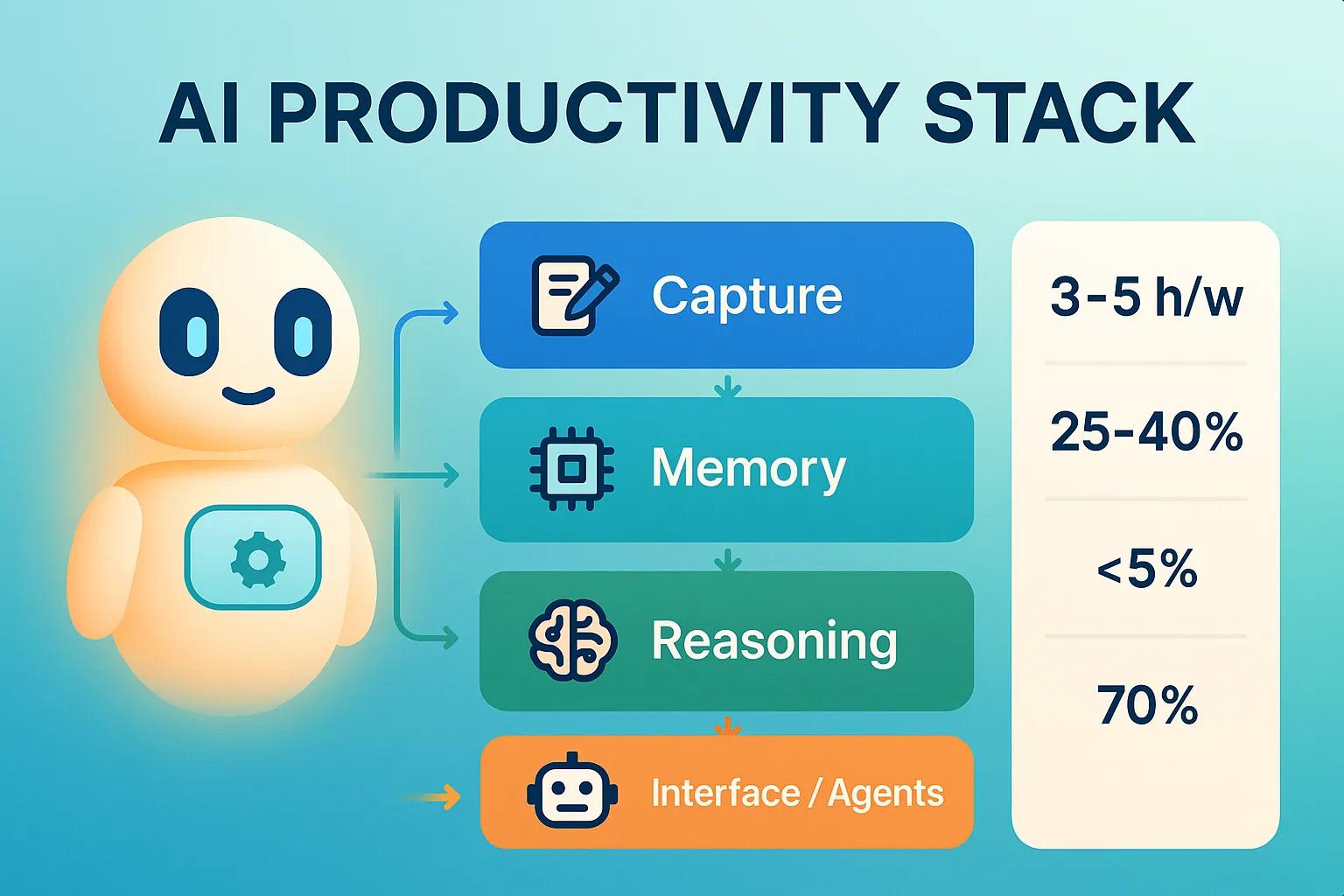
Building a personal AI productivity stack means defining layers—capture, memory, reasoning, and interface—then selecting tools and connectors that move data reliably between them for end-to-end automation. The stack operates by capturing inputs (notes, meetings, emails), storing them in a searchable memory, applying reasoning (summaries, action extraction, prioritization), and exposing outputs through interfaces or agents that take actions. A practical integration checklist includes mapping pain points, choosing a primary capture tool, selecting a knowledge store, wiring an LLM or reasoning layer, and automating routine actions with connectors. The table below maps stack components to roles and example tools to make these decisions concrete and repeatable for different workflows.
This mapping clarifies how each layer contributes to a second brain and prepares you for concrete automation recipes that follow.
- Identify the bottlenecks: Audit tasks that consume time and repeat weekly.
- Choose one tool per stack layer: Limit scope to avoid integration sprawl.
- Connect with a single automation platform: Route triggers and actions through a central connector.
- Iterate with micro-pilots: Test small automations, measure, and expand based on outcomes.
What Are the Steps to Build a Personal AI System or “Second Brain”?
A second brain is a linked system for externalizing ideas, decisions, and context so you can retrieve and reason with them later; it succeeds when capture is effortless and retrieval is precise. Start by mapping your core workflows—meetings, research, project planning—and capture a week’s worth of inputs to understand volume and formats. Next, pick a single capture tool and a single searchable memory where all processed captures land; this prevents fragmentation and improves retrieval relevance. Then connect a reasoning layer—an LLM or retrieval system—that can surface summaries, answer queries, or draft tasks from stored content. Finally, create governance rules for retention, tagging, and periodic pruning so the second brain remains useful rather than noisy.
How Do You Integrate Diverse AI Tools for Workflow Automation?
Integrating diverse tools relies on connector platforms or native APIs to create reliable triggers and actions that reflect your processes while preserving security and auditability. Start with common automation patterns such as meeting transcript → knowledge base entry → task creation, or email triage → prioritized task list → scheduled focus blocks. Authentication and data flow design matter: use scoped API keys, least-privilege integrations, and encrypted storage where possible to limit exposure. Monitor automations with logging and error-handling policies so you can detect missed actions quickly and roll back faulty runs. These integration patterns enable low-friction automation that augments decision-making without replacing human oversight.
What Is the AI Productivity Mindset and How Does It Help You Work Smarter?
The AI productivity mindset is a set of behaviors—curiosity, iterative experimentation, and ethical vigilance—that enables individuals to adopt AI tools effectively and sustain productivity gains. This mindset treats AI as a collaborative partner: you frame clear prompts, verify outputs, and use feedback loops to improve tool behavior over time. The practical outcome is reduced task friction and higher leverage on decision-making tasks because routine work is delegated to automation and human energy is focused on high-value judgment calls. Embracing this mindset also includes documenting guardrails, training short workflows for teammates, and celebrating small wins to build trust. The next subsection lists core principles that operationalize this mindset into daily habits.
AI productivity principles simplify adoption and prevent misuse.
- Curiosity and experimentation: Regularly test small automations to discover time-savers.
- Iterative improvement: Measure outcomes and refine prompts and connectors.
- Human-in-the-loop oversight: Always verify critical outputs before action.
What Key Principles Define an Effective AI Mindset for Productivity?
An effective AI mindset emphasizes experimentation, measurable iteration, and ethical oversight—each principle translates into concrete habits that change behavior and outcomes. Experimentation means dedicating short, scheduled time to test tools and prompts so you can discover high-impact automations without disrupting workflow. Iterative improvement requires tracking small metrics—time saved, error rates—and adjusting configurations or prompts based on feedback. Ethical oversight insists on verifying outputs for bias or factual errors and keeping human review for sensitive decisions. A quick self-assessment prompt asks: have you automated one repetitive task this month, and did you measure its impact? That question drives continuous learning and improvement.
How Can You Overcome Resistance and Embrace Human-AI Collaboration?
Resistance often comes from fear of error, loss of control, or perceived job risk; overcoming it requires low-risk pilots, transparent guardrails, and shared learning that demonstrate clear, immediate benefits. Start teams with one or two time-saving automations—email triage or meeting transcription—and measure results to build trust through evidence. Use short training sessions to show how outputs are generated and where human review fits into the loop, then document standard operating procedures that include rollback paths. Encourage a culture of shared experiments where team members report both successes and failures so learning scales. These tactics reduce anxiety and establish human-AI collaboration as a productivity multiplier rather than a threat.
How Can AI Workflow Automation Transform Your Daily Tasks and Decision Making?
AI workflow automation transforms daily work by converting repetitive, low-value tasks into automated sequences that free human attention for strategy and complex judgment. Typical transformations include automating email triage, scheduling, meeting capture and action-item creation, and routine reporting—each reduces time spent on administrative work and shortens feedback loops. For decision support, AI augments humans by summarizing evidence, running what-if scenarios, and surfacing anomalies that require attention, which leads to faster, more informed choices. Below are practical automation examples and an ROI-oriented approach to estimate time savings and prioritize automations.
High-value automations provide immediate time returns and reduce cognitive load.
- Email triage: Auto-label and create prioritized tasks from important emails.
- Meeting capture: Automatically create searchable notes and action items after calls.
- Report generation: Aggregate data sources and produce weekly summaries for stakeholders.
Prioritize automations by potential weekly hours saved and error reduction to maximize ROI and guide implementation sequencing.
Which Repetitive Tasks Can AI Automate to Save Time?
AI can automate many repetitive tasks across roles, notably communication triage, meeting notes, scheduling, and routine data aggregation, each offering quantifiable time savings. For knowledge workers, automated meeting transcription that extracts action items can convert an hour of meeting time into minutes of follow-up work, while email triage tools reduce time spent processing messages. Managers benefit from automated status reports that combine task data into concise dashboards, and developers gain speed with code suggestions and tests from tools like GitHub Copilot. Mapping tasks to tools—e.g., Otter.ai for transcription, Zapier for routing actions—lets you pilot high-impact automations with measurable outcomes. Choosing tasks with high frequency and manual effort yields the fastest returns.
How Does AI Support Smarter Decision Making and Real-Time Insights?
AI supports decision making by synthesizing large volumes of text and data into concise summaries, highlighting trends, and enabling scenario simulations that surface probable outcomes, thereby reducing the time to insight. Tools that combine summarization with confidence indicators or source provenance let you quickly judge when to act and when to investigate further. For example, a sales forecast pipeline can use trend detection to flag accounts at risk and simulate outcomes under different effort levels, helping prioritize outreach. Maintaining a human-in-the-loop for critical thresholds ensures ethical and contextual judgment complements model outputs. This hybrid approach speeds decisions while preserving accountability.
What Are the Future Trends and Ethical Considerations in AI Productivity for 2025 and Beyond?
Future trends shaping personal AI productivity include wider adoption of agentic workflows, better multimodal reasoning across text, audio, and images, and tighter integrations across ecosystem platforms that enable end-to-end automation. These advances will make personal stacks more autonomous and context-aware, but they also raise concerns about data privacy, bias, and model explainability that individuals must manage proactively. Responsible use involves limiting sensitive data exposure, preserving consent for shared content, and maintaining transparent audit logs for automated actions. The following bullets list imminent 2025 innovations and the ethical steps to keep your toolbox future-proof and safe.
Key 2025 trends and ethical safeguards to watch and adopt.
- Agentic AI and autonomous workflows: Agents that can chain tasks will reduce friction but require strong guardrails.
- Multimodal reasoning: Better integration across voice, text, and images will enable richer capture and retrieval.
- Platform ecosystems: More seamless integrations will make cohesive second brains easier to implement, increasing dependency risks.
What AI Innovations Will Shape Productivity Tools in 2025?
Agentic assistants that can autonomously perform multi-step tasks, improvements in multimodal models that understand voice and images in context, and enhanced reasoning capabilities that link structured knowledge with unstructured notes will shape productivity tools. The implication for personal stacks is greater automation of cross-cutting workflows—transcribing meetings, extracting action items, updating project trackers, and even drafting follow-ups—while maintaining the need for oversight. As platforms offer more native connectors, assembling seamless pipelines becomes easier but also increases the importance of governance. Preparing your system for these advances means standardizing data formats and keeping integration complexity manageable.
How Can You Use AI Responsibly While Protecting Data Privacy?
Using AI responsibly begins with limiting sensitive data exposure, implementing retention and deletion policies, and choosing tools with configurable data handling options to keep private information secure. Practical steps include anonymizing personal identifiers before sending data to an LLM, using local or enterprise-hosted models for sensitive workloads, and maintaining clear consent protocols for shared content. Regular audits of integrations and periodic reviews of access permissions prevent scope creep in what each tool can read or modify. These practices ensure that automation scales without compromising privacy or control.
How Do You Continuously Optimize and Evolve Your Personal AI Productivity Toolbox?
Continuous optimization requires measuring key metrics, running scheduled audits, and staying informed about tool improvements so your stack evolves with your needs and with model and platform changes. Regular measurement lets you prioritize where to expand automation and where to tighten governance; an audit cadence—monthly quick checks and quarterly deep reviews—keeps integrations reliable. Below is a KPI table with concrete metrics and targets to track productivity gains and tool effectiveness, and following that are monitoring practices and feeds to follow for staying current.
To track progress, focus on tangible KPIs and a simple dashboard that captures time saved and coverage.
- Set a monitoring cadence: Monthly quick checks and quarterly audits to review automations and access controls.
- Subscribe to release notes and model trackers: Watch for capability changes that affect integrations and privacy.
- Maintain a pruning routine: Remove unused automations to reduce surface area and technical debt.
What Metrics and KPIs Should You Track to Measure AI Productivity Gains?
Track metrics that capture time saved, automation coverage, output quality, and adoption so you can quantify the toolbox’s impact and prioritize improvements. Time-saved measurements compare baseline durations for repetitive tasks to post-automation durations and provide direct ROI signals. Automation coverage shows the proportion of repetitive tasks handled by your stack and indicates opportunities for expansion. Output quality error rates require periodic sampling and human review, which preserves trust in automated outputs. Together, these metrics guide decisions about scaling automations, tightening governance, or investing in higher-fidelity reasoning layers.
How Can You Stay Updated on AI Tools, Trends, and Semantic SEO Changes?
Staying current requires a lightweight monitoring system: follow model and tool release notes, use alerts for major platform changes, and schedule quarterly reviews of your stack to test compatibility and performance. Subscribe to a small set of reliable feeds and research summaries to avoid noise and focus on changes that matter for your stack: model capability upgrades, connector expansions, and privacy policy updates. Use schema and semantic SEO validators for content that must remain discoverable in AI-driven search environments, and routinely test prompts and retrieval results after major model updates. A disciplined review cadence keeps your second brain accurate and resilient.
- Quarterly stack audit: Test automations, renew credentials, and validate outputs.
- Selective feeds: Track model release notes and trustworthy research summaries.
- Prompt and schema checks: Revalidate prompts and structured data after platform updates.
About the Authors & Contributors
This comprehensive guide was developed by a team of AI productivity consultants and researchers with over a decade of combined experience in artificial intelligence, workflow optimization, and digital transformation. Our expertise spans enterprise AI implementation, personal productivity systems design, and ethical AI development. We are committed to providing evidence-based recommendations and practical strategies to empower individuals and teams to harness AI responsibly and effectively.


